AR Sketch Trace: Anime Drawing
CardsArt & Design
4.811.00 Reviews
- Version
- 2.0.0
- Installs
- 1.00M
- Age Rating
- Everyone
Screenshots
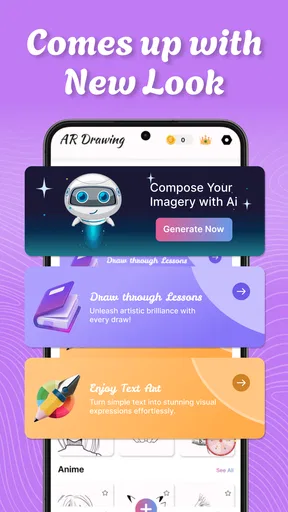
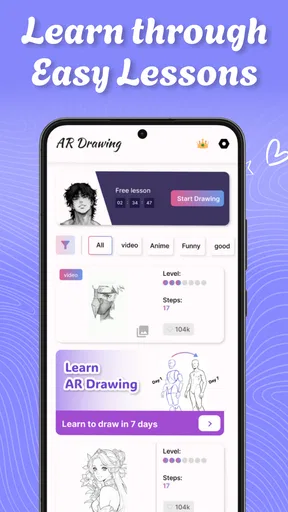
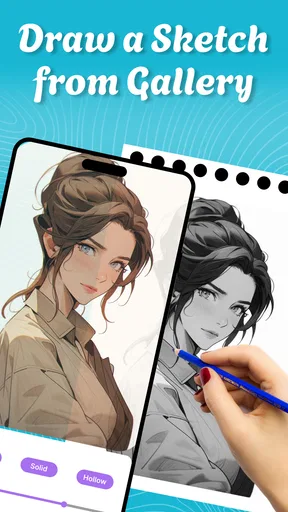
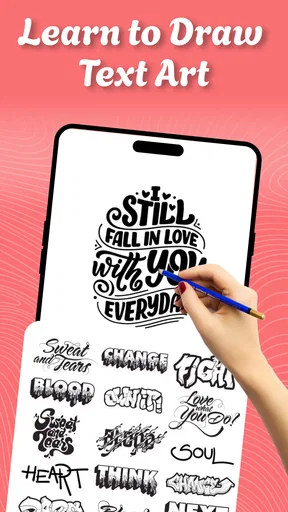
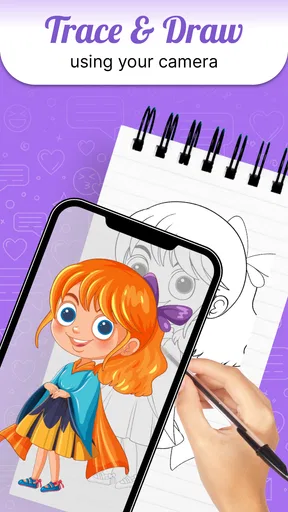
Our Review of AR Sketch Trace: Anime Drawing
 Analysis by Appyee
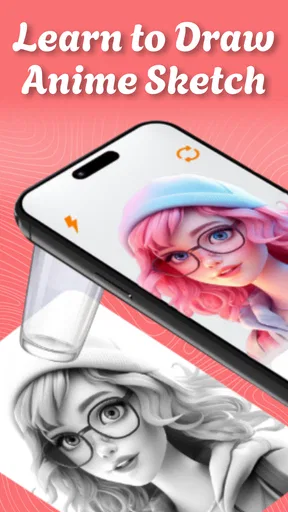
I usually approach drawing apps with some caution because many are exciting for ten minutes and then disappear from my home screen. AR Sketch Trace: Anime Drawing made a better first impression than that. It is an art and design app from Cards that focuses on guided drawing through an augmented-reality tracing approach, with anime sketches and familiar character-focused templates such as Hello Kitty designs. The idea is simple: instead of staring at a finished picture and guessing how to reproduce it, I can use a template as a visual guide while building the drawing myself.
That distinction matters. This is not a full digital illustration studio, and I would not choose it as a replacement for a serious drawing program. Its appeal is more immediate and practical: it lowers the intimidating first step for someone who wants to draw but does not know where to begin. The app is free to install, rated for Everyone, and works on Android devices running version 7.0 or later. In my experience, that makes it approachable for casual learners, younger artists, and anyone looking for a low-pressure way to practise.
The app has reached over a million installs and holds an average rating of 4.8 from around 3,700 ratings, which suggests that its basic concept connects with a substantial audience. The current version is 2.0.0, and it was released on March 9, 2025. Those details are useful context, but they do not tell me whether it deserves a permanent place on my phone. The more important question is what happens after the first week, when the novelty of projecting or following a template starts to wear off.
From an easy first week to a lasting drawing habit
I find the first few sessions most useful when I keep the goal small: choose one template, make a quick attempt, and notice which shapes feel awkward rather than judging the finished page. That turns an easy start into a repeatable routine without making drawing feel like homework. The next question is whether the app’s visual guidance stays comfortable for different hands, eyes, and ways of working.
Why the first sessions feel rewarding
The strongest part of the experience is the reduction of blank-page anxiety. When I open a normal sketchbook, even a simple anime face can feel difficult because I have to decide on proportions, pose, expression, and line placement all at once. A guided template gives me a narrower task. I can concentrate on following shapes, observing curves, and controlling my hand rather than inventing an entire composition immediately.
That makes the app especially useful for a first drawing session with a child, a friend who says they “cannot draw,” or anyone returning to art after a long break. The familiar anime and character-inspired subject matter also helps. A learner is more likely to stay engaged when the goal is a face, mascot, or stylized figure they already recognize instead of an abstract exercise in perspective.
The AR element is the part that separates this app from a basic gallery of drawing tutorials. The phone becomes a guide for placing the image in the physical drawing area, so I can work on paper while looking at the screen. This is a more hands-on process than simply copying a picture from a web page. It encourages me to pay attention to the relationship between the reference and the page, which is a useful early lesson in scale and placement.
There is also a psychological benefit to tracing a structured outline before attempting freehand work. I can see progress quickly, and that early success creates momentum. A completed sketch, even one made with considerable guidance, feels more satisfying than a half-finished drawing abandoned because the opening proportions went wrong. For beginners, that sense of completion can be the difference between practising again and giving up.
How I would use it in an everyday situation
A realistic use case is a short evening drawing session at the kitchen table. I can place the phone where the guide is visible, put paper in a comfortable position, and spend a few minutes following a template rather than planning a large project. This works well when I want a creative break but do not have the energy to learn a complex interface or set up a tablet and stylus.
I would also use it as a warm-up before drawing independently. Instead of treating the template as the final goal, I can study the construction: where the head begins, how the eyes line up, how the hair overlaps the face, and which curves define the silhouette. After finishing the guided version, I can put the reference aside and redraw one feature from memory. That turns a tracing session into a small observation exercise.
A useful habit is to avoid trying to make the first attempt perfect. I would use one sheet for a quick, loose pass and another for a cleaner version. The first pass reveals which parts of the template are difficult to follow, while the second gives me a chance to correct pressure, spacing, and proportion. This two-step workflow extracts more learning from the same design than simply tracing once and moving on.
What the template approach teaches—and what it does not
Guided drawing is good at showing shape relationships, but it can hide weaknesses if I rely on it too heavily. A template may help me place an eye accurately without teaching me why that eye belongs there or how the face changes when the head turns. The app therefore works best as a bridge into drawing, not as a complete course in anatomy, perspective, shading, or visual storytelling.
My recommendation is to use the guide in stages. First, follow the main outline. Next time, reduce how closely you follow it and try to remember the largest shapes. On a later attempt, use the template only as a quick reference before drawing independently. This gradual reduction of support is important because it prevents the comfortable tracing stage from becoming a permanent ceiling.
The app is most valuable when the template is treated as training wheels rather than the destination. That is the central trade-off. It can make practice feel accessible, but the user has to add the learning step deliberately. Someone who only wants attractive finished outlines may be satisfied immediately; someone who wants genuine improvement will need to work beyond the guide.
Choosing the right environment for AR tracing
AR tracing is more sensitive to the physical setup than ordinary drawing software. I get better results when the phone is stable, the paper is positioned comfortably, and the lighting makes the screen easy to see without creating distracting reflections. A rushed setup can turn a simple exercise into repeated adjustments, especially if the phone shifts while I am following a line.
This is one reason I would not judge the app only by how it feels during a quick test. The first session may involve finding a workable angle and learning how to keep the reference visible while drawing. Once that arrangement becomes familiar, the process is more natural. If I expect to use the app regularly, I would keep a small, repeatable setup ready rather than rebuilding the entire arrangement every time.
What keeps it useful after the novelty fades
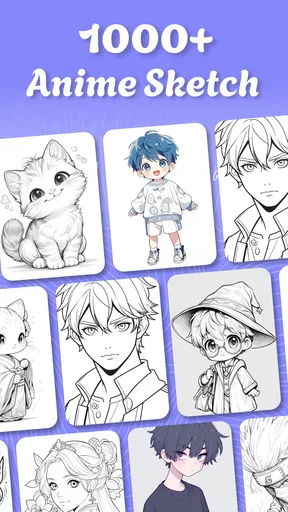
The large template collection is the obvious source of replay value. With more than a thousand templates advertised through the app’s store summary, there is enough variety to support browsing for a while instead of exhausting the selection in one sitting. The practical value, however, depends on how intentionally I use that variety. Switching from one attractive character to another can feel productive without developing any particular skill.
I find the collection more useful when I organise my own practice around a theme. One week might focus on faces, another on hair shapes, and another on full-body outlines. Even if the app does not turn that plan into a formal course, I can create a progression by choosing templates that gradually demand more control. The same library then becomes a source of structured repetition rather than an endless scroll of disconnected pictures.
For a casual user, recurring value may come from creative prompts. I can choose a design when I need a quick activity, use it for a handmade card, or turn a guided outline into a colouring project. Families may find that useful because the app can support a shared table activity without requiring everyone to have the same drawing ability.
For a more serious learner, the long-term benefit is narrower but still real. Repeated use can improve confidence with line placement and observation, especially when I compare early attempts with later ones. The app is less likely to remain useful if I expect it to supply advanced instruction by itself. At that point, a structured drawing course, anatomy reference, or full-featured illustration app would offer deeper progression.
Where the maintenance burden appears
The main maintenance burden is not complicated account management or project organisation; it is physical consistency. I need a stable surface, a sensible phone position, suitable paper, and enough light to see the guide clearly. That sounds minor, but small interruptions matter in a habit built around short sessions. If setting up takes longer than the drawing itself, I am less likely to return on a busy day.
There is also a device-related consideration. The app depends on an AR-style tracing workflow, so the experience is naturally tied to how comfortably a particular phone can be positioned and viewed. A small screen may make fine details harder to follow, while an awkward stand or unstable surface can cause frustration. I would test the setup with a simple template before committing to a long drawing session.
The free entry point is helpful, but in-app purchases range from $0.49 to $99.99 per item. That wide range means I would pay attention before unlocking anything, particularly if a child is using the device. The app can be tried without an upfront purchase, yet “free” does not mean every part of the experience will necessarily remain free. I would decide in advance whether I am comfortable paying for additional content and avoid treating every attractive template as an essential upgrade.
Another form of maintenance is creative. If I always select the easiest familiar character, the app can become repetitive even when new templates remain available. I would keep a small record of what I have practised and deliberately revisit difficult features. That prevents the library from becoming a browsing habit rather than a drawing habit.
Sources of fatigue after repeated use
The first source of fatigue is the gap between tracing and independent drawing. Finishing a polished-looking guided sketch can create an inflated sense of progress, followed by disappointment when I try to draw the same subject without assistance. The solution is not to abandon tracing, but to pair it with short unsupported exercises. Even a few minutes of freehand work after a template can reveal what I actually learned.
The second source is the physical limitation of drawing while watching a phone. I may need to divide my attention between the page, the screen, and the position of the device. That is engaging at first, but it can feel less natural than working from a printed reference or a second monitor. Artists who already have a comfortable tablet workflow may see the AR approach as an extra layer rather than an improvement.
The third is the risk of visual sameness. Anime-oriented templates can be appealing, but a narrow focus on stylized faces and character outlines will not cover every artistic goal. If I want landscapes, realistic portrait studies, detailed painting, typography, or professional layer-based editing, this is not the right primary tool. A conventional drawing app gives me more control over brushes, layers, corrections, and original composition.
There is also a motivational limit. Templates provide direction, but they do not automatically create a personal style. After repeated sessions, I may want to alter the eyes, change the hairstyle, invent clothing, or combine elements from different references. That is the point where I would move between this app and a blank canvas rather than expecting the guide to handle the creative decisions for me.
Who should use it and who should skip it
I would recommend it to complete beginners, casual anime fans, parents looking for a simple creative activity, and people who enjoy drawing on paper but need a visual starting point. It is also a good fit for someone who wants a low-commitment way to test whether guided sketching feels motivating before investing in a more advanced art setup.
I would be more cautious about recommending it to experienced digital artists. If I already work comfortably with layers, stabilised brushes, selection tools, and custom references, the app may feel restrictive. The same applies to anyone seeking a formal, progressive curriculum. Its guided templates can support practice, but they should not be mistaken for comprehensive instruction.
Users who dislike arranging a phone over paper may also prefer a normal tutorial video or a static reference image. Those alternatives are less interactive, but they can be easier to pause, enlarge, annotate, and revisit. A printed reference is especially useful when I want to draw without screen glare or device positioning issues.
The age rating of Everyone makes the concept broadly accessible, but younger users still benefit from supervision around purchases and device handling. I would also explain that tracing is a learning method, not the same as creating an original illustration from scratch. That small distinction helps set healthy expectations and encourages the child to experiment beyond the outline.
How it compares with ordinary alternatives
Compared with a blank sketchbook, this app offers direction and immediate subject matter. The sketchbook remains better for unrestricted ideas, but it can be intimidating at the beginning. Compared with a video tutorial, the app feels more direct because I can work at my own pace without constantly pausing and rewinding. The video is stronger when I want to hear an explanation of technique or understand the reasoning behind each stroke.
Compared with a standard digital art app, this one trades control for accessibility. I do not approach it expecting a deep toolset or a professional illustration workflow. Its advantage is the physical connection between the guide and the page. That can make practice feel more tangible, especially for people who find drawing on glass less satisfying than drawing on paper.
Compared with a tracing projector or printed transparency, the phone-based method is more flexible because I can browse templates without preparing a separate physical reference. The trade-off is that the phone must remain part of the setup, and the visual alignment may require patience. For occasional creative use, that convenience may be enough. For long studio sessions, a dedicated reference arrangement could be more comfortable.
My long-term verdict
After the initial excitement settles, I think the app earns lasting space for a specific type of user rather than everyone. Its strongest recurring value is as a friendly entry point and a source of short, guided practice. I can open it when I want a quick drawing prompt, use a template to study a particular shape, and then carry that observation into a normal sketchbook or another art tool.
I would not keep it as my only drawing app. The reliance on templates, the physical demands of AR tracing, and the possibility of repeating familiar designs can all limit long-term growth. The in-app purchase range also means I would approach optional content carefully instead of assuming the free installation tells the whole cost story.
Still, the product succeeds at making drawing feel less intimidating. Cards has built something that can turn a blank page into a manageable exercise, and the anime and Hello Kitty-oriented material gives the practice an immediate emotional hook. Version 2.0.0 is a sensible point at which to judge it as a practical beginner tool rather than a novelty.
My final recommendation is to keep it if it leads you from guided outlines toward independent sketches. Use the templates as warm-ups, repeat difficult features, change details, and occasionally draw without the guide. If that routine develops, the app has genuine month-to-month value. If I find myself only browsing designs or reproducing the same easy outline, I would move on to a more open-ended drawing tool. In short, AR Sketch Trace: Anime Drawing is worth trying for approachable paper-based practice, but its lasting usefulness depends on whether I turn its guidance into a broader drawing habit.
Verdict
Strengths of AR Sketch Trace: Anime Drawing
- Beginner-friendly tracing guides make anime proportions easier to practice.
- Camera overlay helps users draw on paper without constantly checking a reference.
- Includes a variety of anime-inspired templates for different skill levels.
- Useful for practicing line control, facial features, and basic poses.
- Simple interface lets you start a drawing session with minimal setup.
Limitations of AR Sketch Trace: Anime Drawing
- Requires a steady phone position for accurate and comfortable tracing.
- Some templates or tools may be locked behind ads or in-app purchases.
- Camera-based tracing works best in bright, evenly lit surroundings.
- The overlay can limit creativity if users rely too heavily on existing templates.
- Long drawing sessions may drain the battery because the camera stays active.
Other Releases by Cards
View All
Cards - Mobile Wallet
Productivity4.6

Drawing Pad Lite - Artbook
Art & Design4.5

Phone Mirror app - True Mirror
Beauty4.6

Ghost Detector Pro Radar
Entertainment4.6
Similar Picks in This Category
View All
Canva: AI Photo & Video Editor
Canva4.8

PENUP – Drawing-sharing SNS
Samsung Electronics Co., Ltd.4.5

Crafto
Kutumb App4.6

Sketchbook
Sketchbook4.1

ibis Paint X
ibis inc.4.5

Adobe Express: AI Photo, Video
Adobe4.6
Frequently Asked Questions
What is AR Sketch Trace: Anime Drawing, and how does it work?
AR Sketch Trace: Anime Drawing is a drawing assistant that uses augmented reality to place an anime-style reference image over your real-world surface through the phone’s camera. After choosing or importing an image, you can position your device, place paper underneath, and trace the visible guide. It is designed to help beginners practice proportions, outlines, facial features, and character poses rather than automatically creating a finished drawing.
Do I need artistic experience or special equipment to use the app?
No previous drawing experience is required, which makes the app useful for beginners learning anime illustration. You generally need a compatible Android or iOS device with a working camera, a flat surface, paper, and a pencil or other drawing tool. A phone stand or tripod is not always essential, but it can make the tracing process more stable and comfortable during longer drawing sessions.
Can I use my own anime images or only the references included in the app?
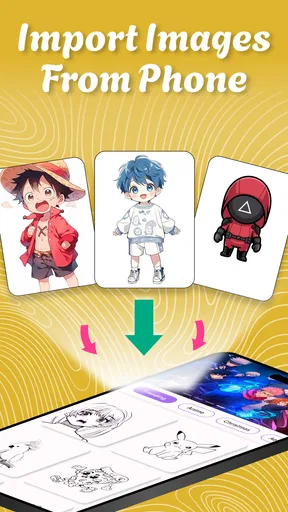
The available image options may depend on the version of AR Sketch Trace: Anime Drawing installed on your device. In addition to built-in references, the app may provide ways to select images from your gallery or use camera-based content, allowing you to practice with subjects you prefer. Before downloading, check the current app description and permissions to confirm whether importing personal images is supported.
Does AR Sketch Trace: Anime Drawing require an internet connection?
Some functions may work offline after the application and its available drawing resources have been installed, especially when you are using saved or built-in references. However, internet access can be required for advertisements, downloading additional content, updates, account-related features, or online image tools. Availability may vary by version and platform, so users who plan to draw without Wi-Fi should test their chosen references in advance.
Is AR Sketch Trace: Anime Drawing free, and does it contain ads or in-app purchases?
The application may be available as a free download, but free access can include advertising, locked reference packs, premium tools, or optional in-app purchases. Pricing and included features can differ between Android and iOS and may change after updates. Review the store listing carefully before installing, particularly if you want an ad-free experience or access to the complete anime drawing collection.
